PXLQuill / Guide 13
Generate and export
Create a report snapshot you can review and deliver.
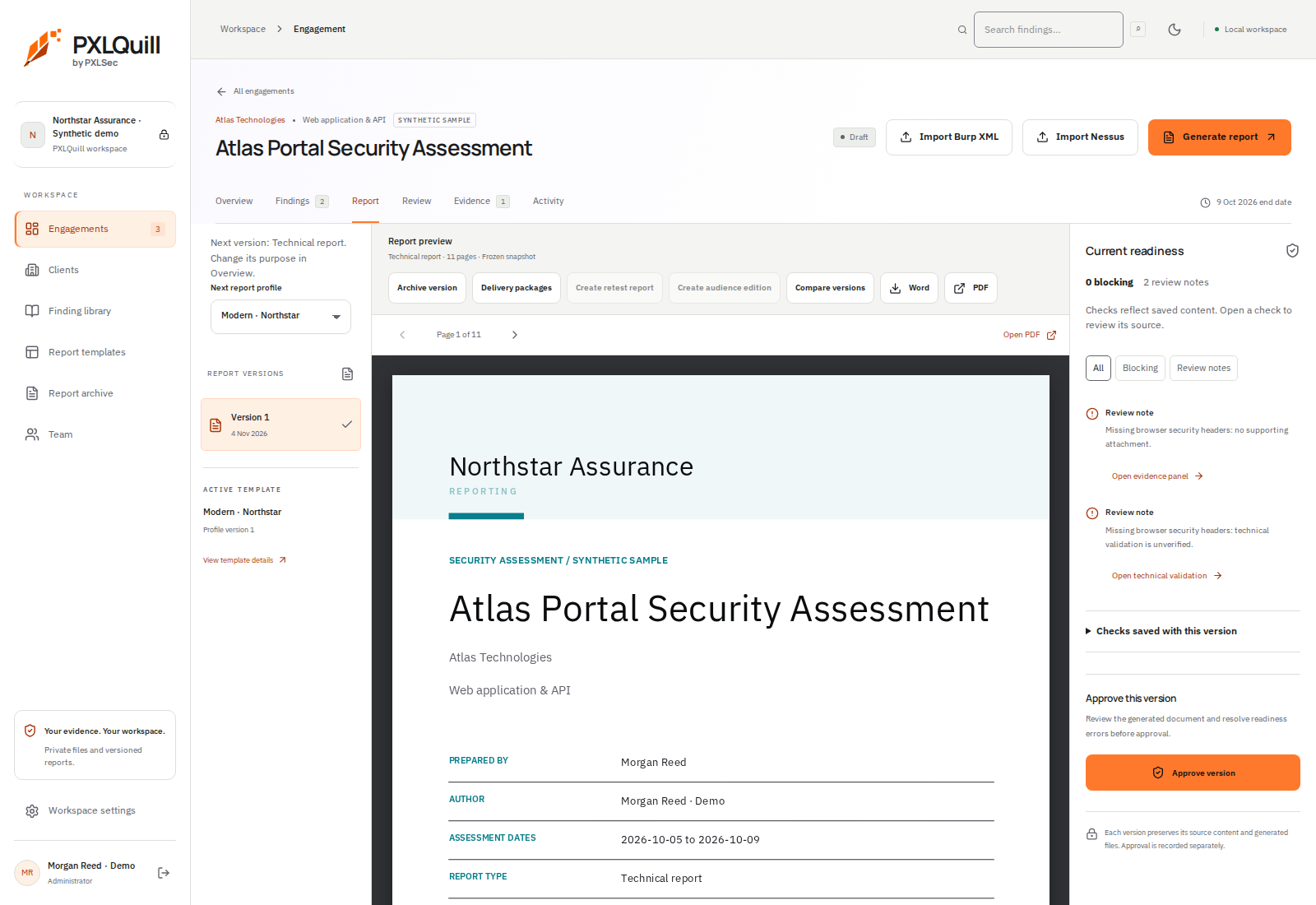
- 1Select the next report profile
The profile controls the next generated version. Existing saved versions keep their design.
- 2Inspect and export the selected version
Compare versions or download the PDF and Word files from the report toolbar.
- 3Review readiness
Inspect blockers and review notes. Approval is a separate action from generation.
01 / Save and check readiness
Finish pending edits, choose the intended report profile and inspect readiness messages. Resolve the checks that block generation, and review any warnings that affect the report’s meaning.
02 / Generate a version
Choose Generate report. The worker creates a frozen snapshot and its export files. Wait for the ready state; a queued or failed version is not a completed deliverable.
03 / Inspect the document
Use the report preview to check the cover, summary, finding register, evidence and closing material. Download PDF or DOCX as appropriate. Word layout should also be checked in the recipient’s word processor.
04 / Make changes through a new version
If you find a mistake, edit the draft and generate another version. Keep the previous version as the historical record. The sample download on this page was generated from the real application using fictional data.